
commercebuild Success Portal commercebuild Success Portal

  • Home
  • Submit a Ticket
  • Updates
  • Login
  • Contact Us
Home / Tutorials / View Web Store Email Log

View Web Store Email Log

735 views Less than a minute 6

You can view the emails that your web store sends to users via the Dashboard.

Go to ERP Integration > Site Logs.

Ensure the dropdown box in the top-right is set to Mail Log. If your site is still on Sync 1, then the Replication Log is shown by default.
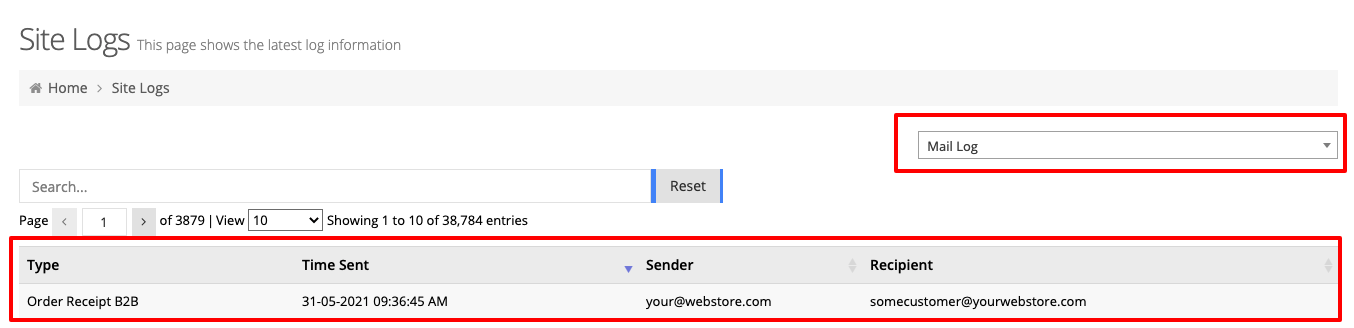
If the emails are logged here and your customers are not receiving emails, verify that your domain has an SPF record set that authorizes commercebuild to send emails on its behalf.

webstore Tutorials

About Bradly Hale

View all posts by Bradly Hale →

Related Articles

  • How to Enable reCAPTCHA on Custom Forms
  • Adding a custom message to the shipping step at checkout
  • How to configure Stripe as a payment method
  • SQL Server Change Tracking Query for Sage 300 and X3

Popular Articles

  • Enable Cloudflare Rate Limiting 2860 0
  • How to Generate Sitemaps and the Google Product Feed 2783 0
  • Enable Firewall Rules and a JavaScript Browser Challenge 2713 16
  • How to Add a JavaScript Snippet 2395 8
  • IP Allowlist 2338 0

New Articles

  • Error when adding a new user: Email is already in use 920 0
  • How to Check commercebuild Payments Version 1197 0
  • How to Enable reCAPTCHA on Custom Forms 1127 0
  • Manually posting an order 1261 0
  • Adding a custom message to the shipping step at checkout 1060 0
© commercebuild 2022. All rights reserved.