
commercebuild Success Portal commercebuild Success Portal

  • Home
  • Submit a Ticket
  • Updates
  • Login
  • Contact Us
Home / FAQ, Troubleshooting / How to Grey Cloud (Deactivate Proxy) at Cloudflare

How to Grey Cloud (Deactivate Proxy) at Cloudflare

1635 views Less than a minute 0

Cloudflare is an excellent tool to improve the performance of your web store. However, in some cases, it might conflict with admin operations in the store. For example, Cloudflare enforces limits on how long an HTTP request can run. This is good practice, but some HTTP processes on the web store need to run for longer than the limitation at Cloudflare.

To temporarily get around these limits, we may request that you “grey cloud” traffic to the store. In other words, this means that we’re asking you to temporarily deactivate Cloudflare’s proxy.

Here’s how:
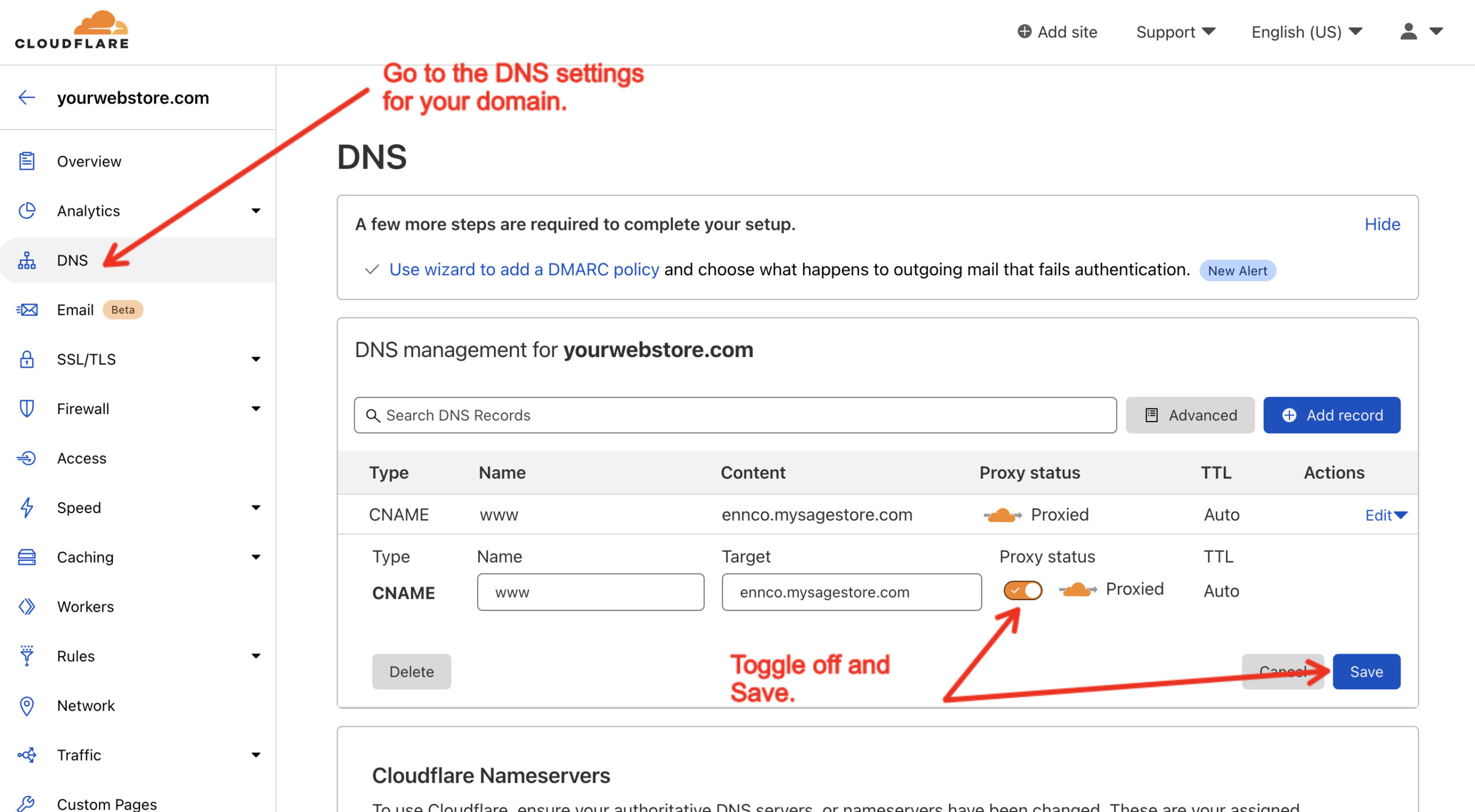
Once this is completed, the limitations imposed by Cloudflare should be removed.

webstore FAQTroubleshooting

About Bradly Hale

View all posts by Bradly Hale →

Related Articles

  • Error when adding a new user: Email is already in use
  • System Notification: Product is no longer available
  • How to Check a Price in Sage 300
  • General troubleshooting of display issues

Popular Articles

  • How to Delete or Deactivate Promo Codes 3720 0
  • How to Generate Sitemaps and the Google Product Feed 3629 0
  • Enable Cloudflare Rate Limiting 3071 0
  • Enable Firewall Rules and a JavaScript Browser Challenge 2865 16
  • IP Allowlist 2611 0

New Articles

  • Error when adding a new user: Email is already in use 1094 0
  • How to Check commercebuild Payments Version 1384 0
  • How to Enable reCAPTCHA on Custom Forms 1239 0
  • Manually posting an order 1460 0
  • Adding a custom message to the shipping step at checkout 1253 0
© commercebuild 2022. All rights reserved.