
commercebuild Success Portal commercebuild Success Portal

  • Home
  • Submit a Ticket
  • Updates
  • Login
  • Contact Us
Home / Tutorials / Rename Add To Cart Button For Out Of Stock Products

Rename Add To Cart Button For Out Of Stock Products

691 views Less than a minute 0

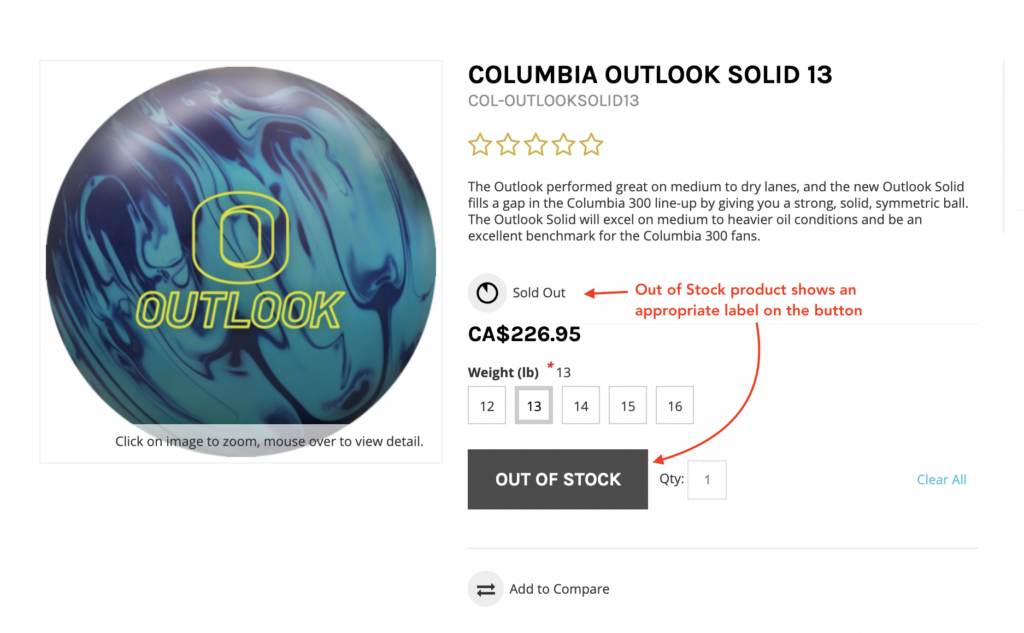
When a product goes out of stock and cannot be added to the cart, you have an option to modify the label of Add to Cart button to show a more descriptive text.

Modify label

In your admin dashboard, navigate to System > Features. Select B2C from the dropdown.

Locate and enable Show Out of Stock Messages and enter a text in the Title for Out of Stock Messages field.

Click Update to save your changes.

This is how it will look on the frontend for products that are not in stock:
webstore Tutorials

About Latika

View all posts by Latika →

Related Articles

  • How to Enable reCAPTCHA on Custom Forms
  • Adding a custom message to the shipping step at checkout
  • How to configure Stripe as a payment method
  • SQL Server Change Tracking Query for Sage 300 and X3

Popular Articles

  • How to Generate Sitemaps and the Google Product Feed 3256 0
  • Enable Cloudflare Rate Limiting 2930 0
  • Enable Firewall Rules and a JavaScript Browser Challenge 2820 16
  • How to Add a JavaScript Snippet 2469 8
  • IP Allowlist 2442 0

New Articles

  • Error when adding a new user: Email is already in use 975 0
  • How to Check commercebuild Payments Version 1252 0
  • How to Enable reCAPTCHA on Custom Forms 1198 0
  • Manually posting an order 1330 0
  • Adding a custom message to the shipping step at checkout 1119 0
© commercebuild 2022. All rights reserved.