
commercebuild Success Portal commercebuild Success Portal

  • Home
  • Submit a Ticket
  • Updates
  • Login
  • Contact Us
Home / FAQ, Getting Started / About Elasticsearch

About Elasticsearch

1978 views Less than a minute 0

What is Elasticsearch

Elasticsearch is a caching mechanism which allows your customers to access a variety of different data points quickly and efficiently.

Support for Elasticsearch

commercebuild continues to build in support for Elasticsearch into the platform, including automatic reindexing when certain events occur in your store. For example, when you modify a content page, we automatically reindex that page so that it shows correctly for B2C guest users.

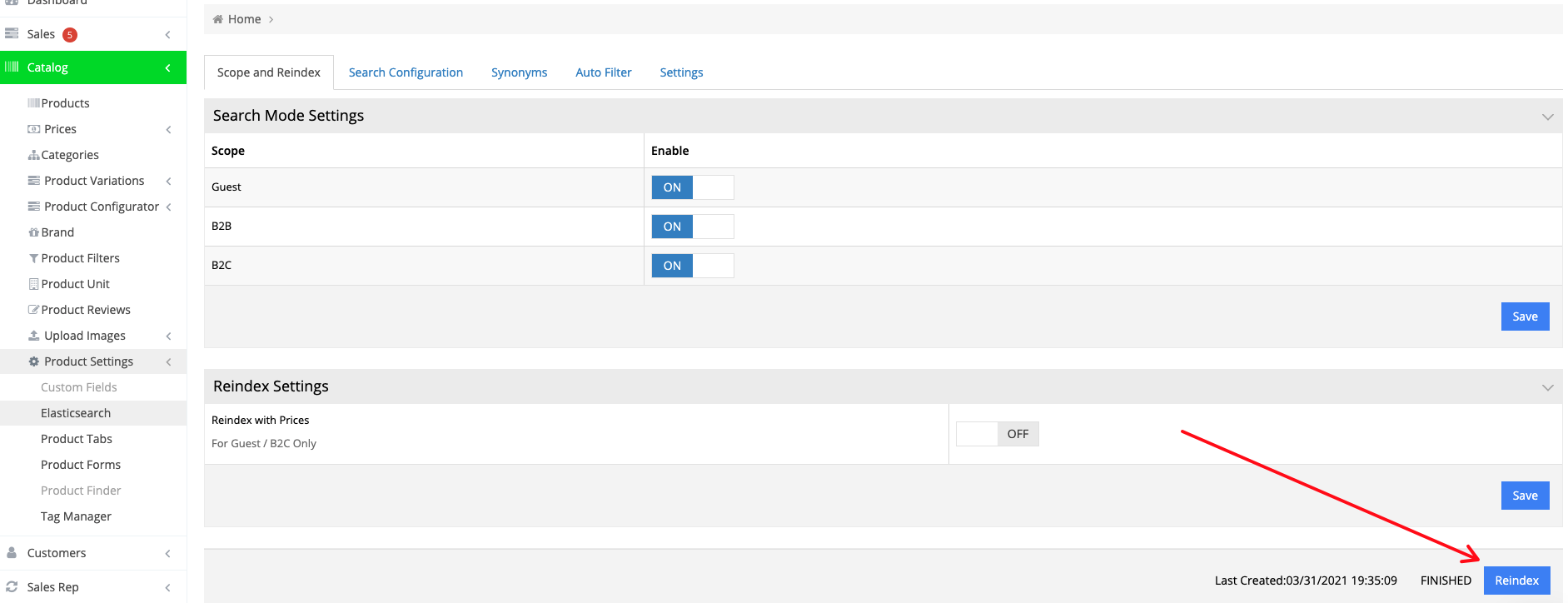
Reindexing Elasticsearch Manually

There may be events that do not automatically trigger reindexing. Therefore, we recommend that you periodically run a Reindex job.

To achieve this, go to Catalog > Product Settings > Elasticsearch and click Reindex.
webstore FAQGetting Started

About Bradly Hale

View all posts by Bradly Hale →

Related Articles

  • Modules Required for commercebuild Sage 300 User
  • Enabling Promotion Field in Checkout
  • Adding Tax Exemptions in Avalara
  • How to Grey Cloud (Deactivate Proxy) at Cloudflare

Popular Articles

  • How to Generate Sitemaps and the Google Product Feed 3560 0
  • How to Delete or Deactivate Promo Codes 3519 0
  • Enable Cloudflare Rate Limiting 3045 0
  • Enable Firewall Rules and a JavaScript Browser Challenge 2843 16
  • How to Add a JavaScript Snippet 2577 8

New Articles

  • Error when adding a new user: Email is already in use 1074 0
  • How to Check commercebuild Payments Version 1353 0
  • How to Enable reCAPTCHA on Custom Forms 1213 0
  • Manually posting an order 1437 0
  • Adding a custom message to the shipping step at checkout 1228 0
© commercebuild 2022. All rights reserved.