
commercebuild Success Portal commercebuild Success Portal

  • Home
  • Submit a Ticket
  • Updates
  • Login
  • Contact Us
Home / FAQ / How to View the Abandoned/Rejected Order Queue

How to View the Abandoned/Rejected Order Queue

1478 views Less than a minute 0

If a customer tries to process an order but fails — perhaps due to a payment issue of some kind — you can generally find this order in the Abandoned/Rejected Order Queue.

In the web store admin, go to Sales > Order Queue, and then under “Processing Status”, select “Abandoned/Rejected”.
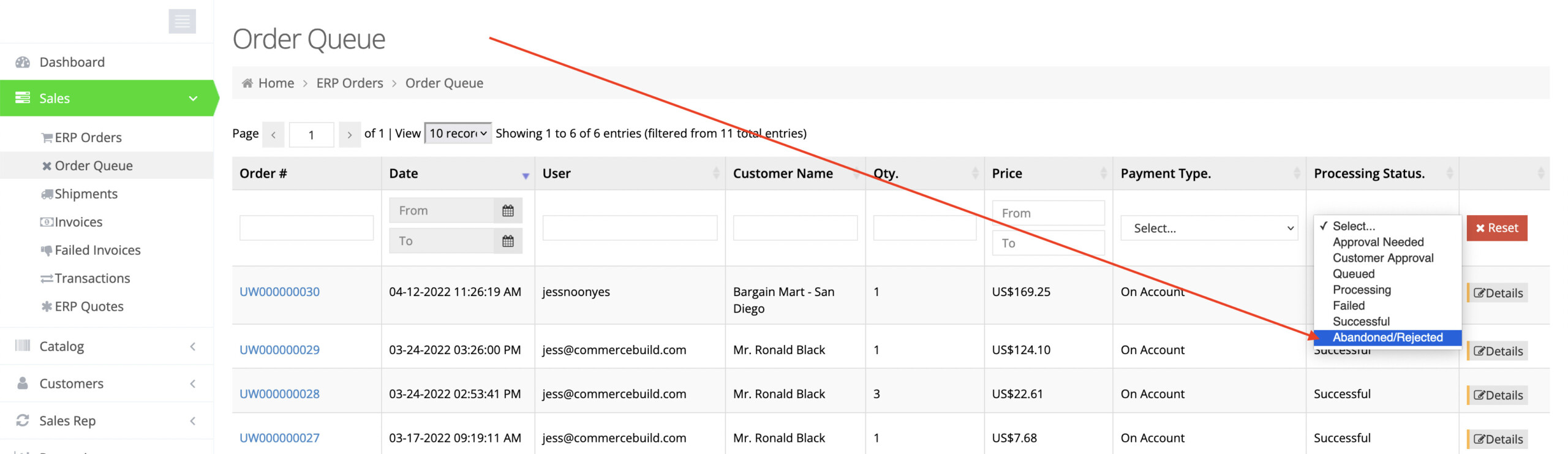
Note that this section should not be confused with cart abandonment. The only orders that get logged here are those that get assigned an order number, which typically does not occur until a user clicks Place Order in the web store.

webstore FAQ

About Bradly Hale

View all posts by Bradly Hale →

Related Articles

  • Enabling Promotion Field in Checkout
  • Adding Tax Exemptions in Avalara
  • How to Grey Cloud (Deactivate Proxy) at Cloudflare
  • How to Modify Transaction Email Recipients

Popular Articles

  • How to Generate Sitemaps and the Google Product Feed 3256 0
  • Enable Cloudflare Rate Limiting 2930 0
  • Enable Firewall Rules and a JavaScript Browser Challenge 2820 16
  • How to Add a JavaScript Snippet 2469 8
  • IP Allowlist 2442 0

New Articles

  • Error when adding a new user: Email is already in use 976 0
  • How to Check commercebuild Payments Version 1255 0
  • How to Enable reCAPTCHA on Custom Forms 1200 0
  • Manually posting an order 1332 0
  • Adding a custom message to the shipping step at checkout 1124 0
© commercebuild 2022. All rights reserved.